v5.1 [Jan 29, 2021]
- Capture highlighted text from Adobe PDF files – capture straight from ClaroPDF Windows and sort according to the highlight colour so you can quickly analyse and collect your sources, great for study and writing.
- New ribbon interface. Provides modern appearance similar to Microsoft Office that’s easier and more fun to use.
- New minibar that stays out of the way as you read and work, but lets you capture with a click easily whenever you want.
- ClaroCapture handles your sources better: it records where you made a capture and lets you open it again more easily.
- Old-fashioned System Tray (notification area) icon removed, now access ClaroCapture easily straight from the Taskbar with Quick Access shortcuts.
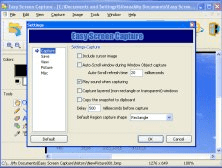
- Screen Capture now works in multi-screen environments.
v3.0 [Jun 13, 2013]
- Supports dragging and dropping items into the capture list.
- Capturing from Firefox and Chrome now also captures the address of the current web page, just like it does in Internet Explorer.


With Nokia Multimedia Factory, you can create multimedia messages on your PC.